
fsprune is a command-line tool I built for removing duplicate files in very large trees. It keeps a lasting catalogue of every file it has seen and every action it has taken, so a later scan of a different folder dedupes against everything before it. Removing a file moves it into quarantine, undo puts it back, and only an explicit purge destroys anything. It’s a general-purpose tool; my home server is one place it runs.
The problem
Checking a large file tree by hand is slow and easy to get wrong. The failures I designed against were not “it missed a duplicate” but “a later run merged badly into a tree an earlier run built” and “it deleted something and there is no way back”.
The first target made this harder. Nextcloud keeps its own index of every file, and its apps read that index rather than the disk. Change the disk behind its back and the index goes stale, and anything removed on disk skips Nextcloud’s own trash, so its undo doesn’t cover it.
What I built
A Python CLI with eight commands over one SQLite catalogue: scan, status, dupes, plan, report, apply, undo and purge. Version one does byte-identical deduplication only.
I built it in phases, one pull request each, from read-only commands to a proving run on a copy before real runs.
How it works
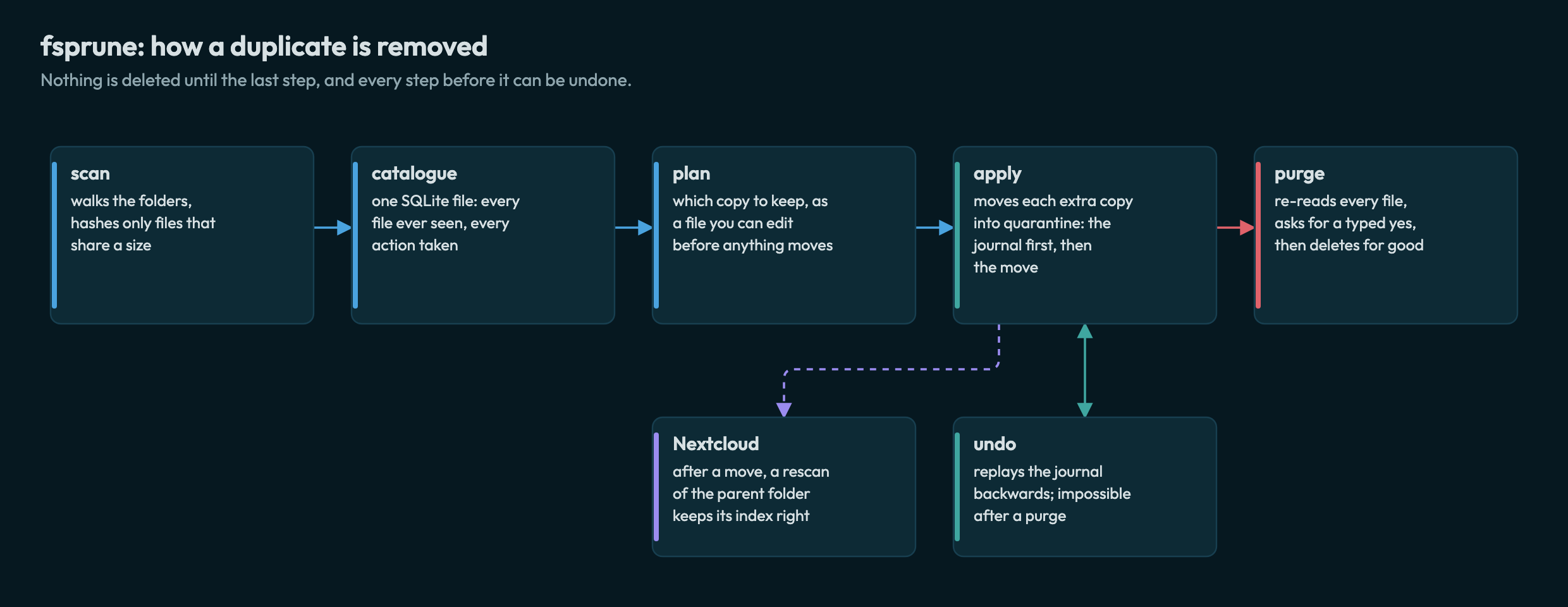
- scan walks the folders and records every file. It hashes only files that share a size with another, so most files are never read.
- plan writes one line per extra copy: what to move, which copy it keeps, and one sentence saying why. Delete a line to drop that action. The keeper is chosen by configured path patterns, then oldest, then shortest path; a group no pattern matches goes to the report for a decision instead of being guessed.
- apply checks every file again against the plan and skips anything that has changed. It writes each move in the journal before making it. Across disks it copies, verifies and only then removes the original, and moves every name of a hardlinked file in one run.
- undo replays the journal backwards and refuses to overwrite anything that has since appeared at a path it would restore.
- purge is the only step that deletes. It re-reads every quarantined file, checks it against the hash recorded when it was moved, writes a list of everything it is about to destroy, and asks for a typed
yes. Its totals count a file with several names once. - On Nextcloud, a rescan of the parent folder after each move keeps Nextcloud’s index in step with the disk.
The design lists sixteen safety rules, each backed by a test: among them, nothing outside purge deletes a user’s file, the journal is written with fsync, hardlinks are one file, symlinks are never followed, system folders are refused even under sudo, paths never pass through a shell, and nothing inside a .git folder is ever grouped or moved, so a repository’s history is never split up to save space. The tests run against a generated tree of awkward cases, such as names with newlines or invalid bytes, and symlink loops. Hardlinks were tested at scale on a purpose-built lab tree: second names, copies, and names outside the catalogue.
Decisions and trade-offs
- A persistent catalogue, not a one-pass directory walker. A walker is simpler, but it can’t dedupe a new folder against one an earlier run tidied. The lasting record is what makes the tool reusable and
undopossible. - Wrap
rmlintrather than write my own hashing. Hashing is a solved problem; the cost is trusting another tool’s output. That cost was real: a test run found that rmlint’s checksum for a unique file covers only its first part. fsprune now records only checksums of proven duplicates, and older catalogues repair themselves when opened. - Read-only against live Nextcloud first. I proved
applyandundoon a separate copy before any run touched data that mattered. Slower, but the first real moves used a tested method. - Run where the data is. Hashing a multi-terabyte tree over SSH would pull every byte across the network, so there is no remote mode; the catalogue is one SQLite file that can be copied anywhere.
The Nextcloud work also led to two upstream reports (see Open source).
What’s next
Version two would add near-duplicate detection, such as the same photo in two formats, and version three would sort files into dated folders. The catalogue leaves room for both; neither is built.
Built with
Python 3 (standard library only), SQLite, rmlint, pytest, ruff, GitHub Actions.